How to actually calculate net profit per Shopify order (worked example)
Get the year-end Shopify payout checklist
Free, by email. We'll also tell you when Profenor is live on the Shopify App Store, and send the occasional note about it.
Sent after you confirm the address. Unsubscribe link in every email. We don't sell your email or use it for anything else.
Your Shopify dashboard shows revenue. It doesn't show what you actually keep. Real per-order profit is four numbers and one formula: revenue − payment fee − cost of goods − any refund = net profit. Here's the formula applied to an actual order, start to finish, so you can run the same math on yours.
What's the formula for net profit per Shopify order?
Every Shopify order reduces to this:
Four inputs. Skip any one of them and the number you're looking at isn't profit — it's revenue wearing a costume. Let's define each piece before we run the example.
1. Revenue
The order total the customer paid — item price plus any shipping you charged them, before any fees come out. This is the number Shopify shows you by default, which is exactly why it gets mistaken for profit.
2. Payment processing fee
On the Shopify Basic plan, Shopify Payments charges 2.9% + $0.30 per online transaction. The 2.9% scales with the order; the $0.30 is a flat cost charged no matter the order size. (Higher Shopify plans have lower percentage rates, and other payment methods can differ — use your actual rate from your Shopify settings.)
3. Cost of goods sold (COGS)
What the product actually cost you to acquire or make — unit cost from your supplier or manufacturer, landed cost if you import, or your bill-of-materials cost if you manufacture. Packaging and inbound freight are often folded in here too, depending on how you've set up your accounting.
4. Refunds and returns
If the order is later refunded in whole or in part, that refunded amount comes back out of your profit — and depending on your processor, the original transaction fee is sometimes not returned to you even when you refund the customer in full. That's a real cost that a lot of sellers forget to track.
Worked example: a $47.00 order
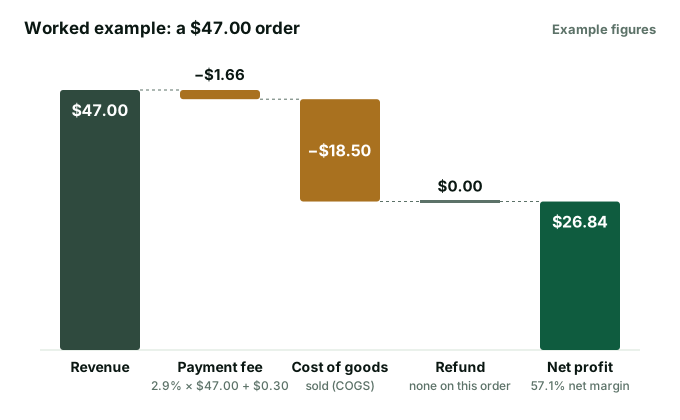
Say you sell a $47.00 item, no shipping charged (free shipping baked into price), on the Shopify Basic plan (2.9% + $0.30), and your COGS for that item is $18.50.
| Line item | Amount |
|---|---|
| Revenue | $47.00 |
| Payment fee (2.9% × $47.00 + $0.30) | −$1.66 |
| Cost of goods sold | −$18.50 |
| Refund | $0.00 |
| Net profit | $26.84 |
Walking the fee line: 2.9% of $47.00 is $1.363, plus the flat $0.30, is $1.663 — rounded to $1.66. Subtract that and the $18.50 COGS from the $47.00 revenue and you're left with $26.84 in actual profit — a 57.1% net margin on this order. That's the number that matters, not the $47.00 that showed up in your sales report.
Now add a refund
Same idea, but the customer gets money back after the sale. Say a $68.00 order, COGS $24.00, and the customer gets a $15.00 partial refund for a shipping delay (item kept):
| Line item | Amount |
|---|---|
| Revenue | $68.00 |
| Payment fee (2.9% × $68.00 + $0.30) | −$2.27 |
| Cost of goods sold | −$24.00 |
| Refund issued | −$15.00 |
| Net profit | $26.73 |
The fee ($2.27) is calculated on the original $68.00 charge, not the post-refund amount — and depending on your payment provider's policy, that processing fee is frequently non-refundable even though you gave $15.00 back to the customer. That's a cost most sellers never separately track; it just quietly reduces margin.
Why track profit per order instead of one average margin?
The flat $0.30 takes a bigger share of smaller orders, and your COGS varies by SKU, so your real margin varies order to order too — sometimes a lot. A $12 add-on item can carry a much thinner true margin than a $120 hero product, even if both "feel" profitable at a glance. A lot of sellers compute one blended margin percentage across the whole store and call it done. Per-order profit is the only view that shows you which:
- Products are actually carrying the business vs. quietly losing money after fees and cost.
- Order sizes or bundles improve your real margin (see the flat-fee math on why small orders get hit hardest).
- Days or campaigns look great on revenue but are weak on what you actually keep.
Free: Real Per-Order Profit Calculator
Plug in your price, fee, COGS, and any refund — see your exact net profit. No signup.
→Doing this for every order, automatically
The calculator above answers it for one order in seconds. Running a live store, you want this same math applied to every order without typing anything in. That's the gap Profenor is built to close: it connects to your Shopify store, applies your payment-fee rate and the unit costs you enter, and calculates per-order profit automatically — plus a full P&L and the IRS code section behind every expense, in one place. In our June 2026 review of 18 leading Shopify bookkeeping and profit tools, re-checked July 2026, this combination — per-order profit, IRS code citations, and multi-state nexus status together — wasn't something we found anywhere else.
See true profit on every order, automatically
Get one week of your books reconciled by hand, free. No card, no signup, no app to install. Profenor is $149/mo when it opens.
Get one week reconciled free →No card · US-based businesses · your files are deleted on the schedule in our engagement notice.
This article is educational and is not tax, accounting, or financial advice. Fee figures reflect Shopify's published Basic-plan online rate (2.9% + $0.30) at the time of writing; your actual rate depends on your plan and payment method — confirm your current rate in your Shopify settings. Whether a specific processing fee is refunded on a refunded order depends on your payment provider's policy — confirm with your processor. Profenor is bookkeeping software, not a CPA firm. © Profenor (RJ-DCF LLC).