The Shopify seller's guide to Schedule C (Form 1040)
Get the year-end Shopify payout checklist
Free, by email. We'll also tell you when Profenor is live on the Shopify App Store, and send the occasional note about it.
Sent after you confirm the address. Unsubscribe link in every email. We don't sell your email or use it for anything else.
If you run a Shopify store as a one-person business, one form carries almost your entire tax story: Schedule C. It's where your sales, your fees, your cost of goods, and every deductible expense come together into a single number — your business profit. This guide walks through the lines that actually matter to a DTC seller, in plain English.
What is Schedule C, and do Shopify sellers file it?
Schedule C, "Profit or Loss From Business," is an attachment to your personal Form 1040. It reports the income and expenses of a business you run yourself, and its bottom line (net profit or loss) flows onto your 1040 as part of your total income.
You generally file Schedule C if you operate as a sole proprietor or a single-member LLC that hasn't elected to be taxed as a corporation. That covers the large majority of independent Shopify sellers. If your business is a partnership, a multi-member LLC, or an S-corporation, you file differently (Form 1065 or Form 1120-S, with income flowing to you on a Schedule K-1) — the mechanics below are Schedule C specific, so confirm your path if you're in one of those structures.
Do you report gross sales or your bank deposits on Schedule C?
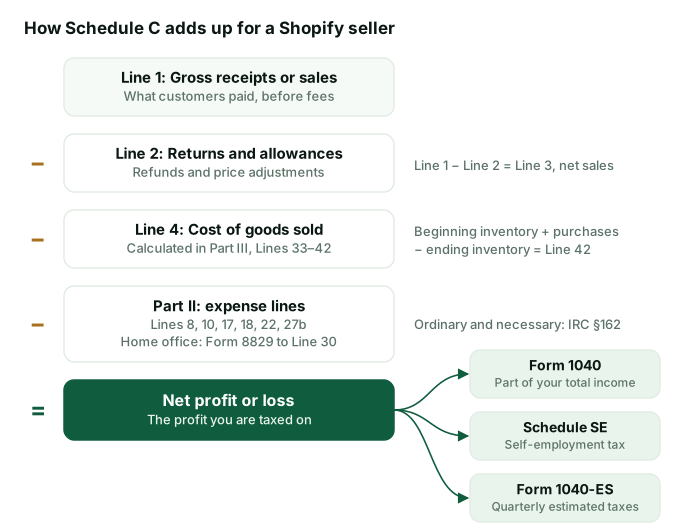
- Line 1 — Gross receipts or sales. This is the total your customers paid, before Shopify or your payment processor took a cent. Not the amount that landed in your bank account. If a customer paid $50, that $50 belongs on Line 1, even though your payout was smaller after fees.
- Line 2 — Returns and allowances. Refunds and price adjustments you gave back to customers. Subtracting these gets you to Line 3, net sales.
The top of Schedule C is where the most common — and most expensive — mistake happens.
Why does this matter so much? Because your payment settlements — and the Form 1099-K your processor may file — report your gross sales, not your net deposits. If you report only what hit your bank, your income won't match what the IRS already has on file. The correct move is to report gross on Line 1 and then deduct the fees separately further down. We break that trap down in detail in Are Shopify fees tax deductible?
Where does cost of goods sold go on Schedule C (Part III, Lines 33–42)?
If you sell physical products, your product costs don't go in the expenses section — they flow through cost of goods sold (COGS), which is calculated in Part III on the back of Schedule C and carried up to Line 4.
Part III walks you through a simple inventory formula:
- Line 33 — Method used to value closing inventory (typically "cost" for most small sellers).
- Line 35 — Inventory at the beginning of the year.
- Line 36 — Purchases (the product you bought to sell).
- Lines 37–39 — Labor, materials, and other costs, if applicable.
- Line 41 — Inventory at the end of the year.
- Line 42 — Cost of goods sold (beginning inventory + purchases − ending inventory), which carries to Line 4.
The key idea: you deduct the cost of a product in the year you sell it, not necessarily the year you buy it. Inventory you still hold at year-end sits on Line 41 and waits. Inventory accounting is governed by IRC §471, and larger businesses also face the uniform capitalization rules of IRC §263A — but many small sellers qualify for a simplified method under the small-business exception in §471(c). Which method fits you is a good question for your accountant.
Expenses: the lines a Shopify seller actually uses (Part II)
Part II is a pre-printed list of expense categories. The umbrella rule for all of them is IRC §162: a business expense is deductible if it's ordinary and necessary for your trade or business. Here are the lines a typical DTC store fills in:
| Schedule C line | What a Shopify seller puts here |
|---|---|
| Line 8 — Advertising | Facebook/Instagram/Google ads, influencer spend, promo costs |
| Line 10 — Commissions & fees | Payment-processing and transaction fees (a common home for the 2.9% + $0.30) |
| Line 17 — Legal & professional | Bookkeeper, CPA, and attorney fees |
| Line 18 — Office expense | Some sellers place software here; postage and office supplies |
| Line 22 — Supplies | Packaging, shipping supplies, materials not in inventory |
| Line 27b — Other expenses | App/SaaS subscriptions, platform fees, domain — itemized in Part V |
Line 8 — Advertising
Your ad spend across platforms is deductible under §162. For most stores this is one of the largest expense lines.
Line 10 — Commissions and fees
Payment-processing and transaction fees frequently land here. Some sellers instead group them under "Other expenses" — as with app subscriptions, what matters most is capturing the cost and being consistent year to year.
Line 17 — Legal and professional services
What you pay a bookkeeper, CPA, or attorney for the business is deductible here.
Line 18 — Office expense & Line 22 — Supplies
Line 18 covers general office costs (and is where some sellers report software). Line 22 is for supplies you use up — packaging and shipping materials that aren't part of your resale inventory typically belong here rather than in COGS.
Line 27b — Other expenses (and where app fees usually land)
Line 27b is the catch-all for legitimate costs without a dedicated line, itemized in Part V. For a Shopify seller this is the usual home for your platform subscription, app/SaaS subscriptions, and payment-processing fees if you don't put them on Line 10. Give each a clear label ("Software & app subscriptions," "Payment processing") so the return tells a clean story.
Home office — via Form 8829
If you use part of your home regularly and exclusively for the business, you may be able to deduct a portion of your home costs. The deduction is calculated on Form 8829 and carried to Line 30 of Schedule C. The "exclusive use" bar is strict — a spare room used only for the store can qualify; the kitchen table generally does not.
Free: Deduction Checker
See where a common Shopify expense typically lands on Schedule C — no signup.
→The two taxes behind the profit number
Self-employment tax — Schedule SE
Your Schedule C net profit isn't just hit with income tax. As a self-employed person you also owe self-employment (SE) tax — Social Security and Medicare — calculated on Schedule SE under IRC §1401. The combined SE rate is set by statute (currently 15.3%: 12.4% Social Security up to the annual wage base, plus 2.9% Medicare). You do get to deduct half of it as an adjustment on your 1040. The practical takeaway: budget for SE tax on top of income tax, because it surprises a lot of first-year sellers.
Quarterly estimated taxes — Form 1040-ES
There's no employer withholding on Shopify profit, so the IRS expects you to pay as you go through quarterly estimated taxes using Form 1040-ES. Missing these can trigger an underpayment penalty even if you pay in full at filing. Setting aside a percentage of every payout into a separate account is the simplest way most sellers stay ahead of it.
The real lesson: clean per-order records make Schedule C trivial
Notice how much of Schedule C is just sorting: gross sales here, refunds there, product cost through COGS, each expense to its line. If your books already know the revenue, fees, and cost behind every single order, filling in Schedule C is close to mechanical. If they don't, tax season becomes a scramble to rebuild a year of activity from bank statements.
That's the gap Profenor was built to close. It records the true economics of every order — revenue, Shopify fees, and cost — and categorizes each expense to the right bucket with the IRS code section behind it, so your Schedule C practically assembles itself and your CPA has clean numbers to work from.
Make Schedule C the easy part of tax season
Get one week of your books reconciled by hand, free. No card, no signup, no app to install. Profenor is $149/mo when it opens.
Get one week reconciled free →No card · US-based businesses · your files are deleted on the schedule in our engagement notice.
This article is educational and is not tax, accounting, or legal advice. Schedule C line references, IRC §162, §471, §263A, §1401, and the forms named here are summarized in plain English and may not reflect your specific situation or the latest IRS guidance. Line numbers can change year to year — always check the current-year form and instructions. Verify any tax treatment with a qualified tax professional. Profenor is bookkeeping software, not a CPA firm. © Profenor (RJ-DCF LLC).